2026 کے بہترین JSON فارمیٹر ٹولز: کون سے واقعی کام کرتے ہیں، اور کون سے بچنے چاہئیں
آپ اپنے API رسپانس کو JSON فارمیٹر میں پیسٹ کرتے ہیں تاکہ پے لوڈ ڈیبگ کر سکیں، اور تین دن بعد آپ کا ڈیٹا کسی لیک رپورٹ میں آ جاتا ہے۔ بات مبالغہ آمیز لگتی ہے، مگر 2026 میں یہ ایک حقیقی خطرہ ہے۔ مارچ 2026 میں کئی مشہور JSON فارمیٹر ایکسٹینشنز ایڈویئر داخل کرتے اور صارف کا ڈیٹا ٹریک کرتے پکڑے گئے۔ صحیح ٹول کا انتخاب اب صرف سہولت کا معاملہ نہیں رہا — یہ ایک سیکیورٹی فیصلہ ہے۔
ایک JSON فارمیٹر ایک ڈویلپر ٹول ہے جو انڈینٹیشن اور سنٹیکس ہائی لائٹنگ کے ذریعے خام، منی فائیڈ ڈیٹا کو قابلِ فہم ڈھانچے میں بدل دیتا ہے۔ 2026 میں زیادہ سے زیادہ سیکیورٹی کے لیے کلائنٹ سائیڈ ٹولز، jq جیسے ٹرمینل کمانڈز، یا تصدیق شدہ اوپن سورس ایکسٹینشنز کو ترجیح دیں تاکہ حساس ڈیٹا لیک نہ ہو۔
2026 میں محفوظ JSON فارمیٹر کا انتخاب کیسے کریں
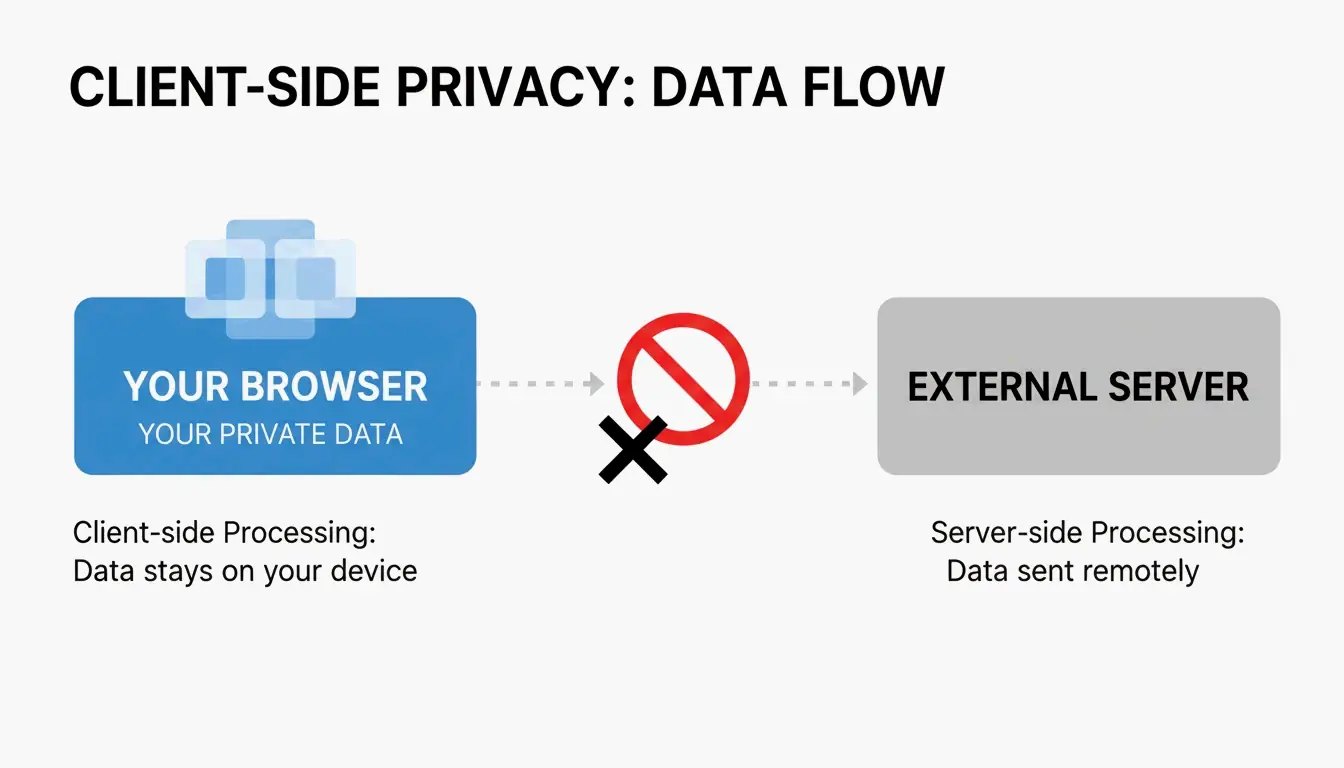
سیکیورٹی بنیادی معیار ہے، کوئی اضافی فیچر نہیں۔ سنہری اصول کلائنٹ سائیڈ پروسیسنگ ہے — آپ کا JSON ڈیٹا آپ کے براؤزر کے اندر رہتا ہے اور کبھی کسی بیرونی سرور تک نہیں پہنچتا۔ جب آپ API کلید، صارف ڈیٹا یا اندرونی کنفیگ پے لوڈ پیسٹ کر رہے ہوں تو یہ فرق بہت اہم ہوتا ہے۔
وہ دو فیچرز جو آپ کو واقعی درکار ہیں
سیکیورٹی کے علاوہ، صرف ان دو فیچرز کی تلاش کریں جو ڈیبگنگ کو تیز کرتے ہیں:
- سنٹیکس ہائی لائٹنگ — رنگوں سے کندہ ڈیٹا ٹائپس (اسٹرنگ کے لیے سبز، نمبرز کے لیے نارنجی) تاکہ آپ ایک نظر میں ڈھانچہ دیکھ سکیں۔
- کولیپس ایبل ٹری ویو — نسٹڈ آبجیکٹس اور اریز کو فولڈ/ان فولڈ کریں تاکہ گہرے ڈھانچوں میں بغیر اسکرول کیے نیویگیٹ کر سکیں۔
10MB کا وارننگ
جیسا کہ JSON Formatter & Viewer نے نوٹ کیا ہے، براؤزر بیسڈ فارمیٹرز کی اکثریت تقریباً 10 MB پر رک جاتی ہے۔ اس سے زائد پر ٹیب فریز ہو جاتا ہے۔ پروفیشنل ٹولز آپ کو بڑی فائلز کے لیے را ٹیکسٹ ویو یا لوکل CLI پروسیسر پر منتقل ہونے کی تجویز دیں گے۔
2026 کا ایکسٹینشن بحران: کیا ہوا اور اب کیا استعمال کریں
مارچ 2026 میں ڈویلپر کمیونٹی نے دریافت کیا کہ کئی مشہور JSON فارمیٹر ایکسٹینشنز ایڈویئر ماڈل کی طرف جھک گئی ہیں۔ Hacker News پر رپورٹس میں انکشاف ہوا کہ ایک وسیع پیمانے پر استعمال ہونے والی ایکسٹینشن (v2.1.14) نے چیک آؤٹ پیجز میں اشتہارات داخل کرنا شروع کر دیے اور بغیر اجازت صارفین کی لوکیشن ٹریک کرنے لگی۔
بنیادی وجہ: ایکسٹینشنز جو Manifest V3 کے کنٹینٹ اسکرپٹس کا فائدہ اٹھا رہی تھیں۔ اگرچہ Manifest V3 کا مقصد بیک گراؤنڈ ٹاسکس محدود کر کے سیکیورٹی بہتر بنانا تھا، مگر یہ ایکسٹینشنز کو کنٹینٹ اسکرپٹس کے ذریعے ویب پیج ڈیٹا میں ہیرا پھیری یا مداخلت آمیز عطیے کی اپیل دکھانے سے نہیں روکتا۔
ChromeBoard اور کمیونٹی تھریڈز کے اعداد و شمار کے مطابق 20 لاکھ سے زائد صارفین متاثر ہوئے۔ ایک متاثرہ پروجیکٹ کے اصل ڈویلپر نے اپنے GitHub README میں لکھا: “I am no longer developing JSON Formatter as an open source project. I’m moving to a closed-source, commercial model.”
محفوظ متبادل
JSON Alexander کمیونٹی کا پسندیدہ متبادل بن چکا ہے۔ اسے معروف ویب ڈویلپر Wes Bos نے بنایا ہے، اور اسے ایک صاف، ہلکا پھلکا، مکمل اوپن سورس متبادل کے طور پر ڈیزائن کیا گیا۔ نہ ٹریکنگ، نہ ایڈویئر، صرف فارمیٹنگ۔
FormatArc ایک اور قابلِ اعتماد اختیار ہے۔ FormatArc کے مطابق، ان کا ٹول کلائنٹ سائیڈ پروسیسنگ کی ضمانت دیتا ہے — “Format” پر کلک کرنے سے آپ کے براؤزر میں ایک JavaScript فنکشن چلتا ہے، کسی ریموٹ سرور کو POST ریکیوسٹ نہیں جاتی۔ آپ اس کی تصدیق خود اپنے براؤزر کے Network ٹیب کھول کر کر سکتے ہیں؛ محفوظ ٹول کے دوران کوئی آؤٹ گوئنگ ٹریفک نہیں ہوگی۔
ڈویلپرز کا ٹول کٹ: CLI اور نیٹیو طریقے
اگر آپ مکمل کنٹرول چاہتے ہیں تو ٹرمینل سے بہتر کچھ نہیں۔ یہ وہ ٹولز ہیں جو کبھی خفیہ طور پر ڈیٹا بیرونی جگہ نہیں بھیجتے۔
jq: انڈسٹری کا معیار
jq JSON پروسیسنگ کے لیے سوئس آرمی چاقو ہے۔ بغیر براؤزر کھولے فلٹر، ٹرانسفارم اور بیوٹیفائی کریں۔
echo '{"id":1,"name":"Alice","active":true}' | jq .

# {
#   "id": 1,
#   "name": "Alice",
#   "active": true
# }

# Extract specific fields
echo '{"user":{"name":"Alice","role":"admin"}}' | jq '.user.name'
# Output: "Alice"

# Format a file
jq . input.json > formatted.json
نیٹیو طریقے: زیرو ڈیپنڈنسی
JavaScript / Node.js:
// Built-in, no install needed
const data = { id: 1, name: "Alice" };
const formatted = JSON.stringify(data, null, 2);
console.log(formatted);
Python:
# Pipe input directly, no install needed
echo '{"id":1}' | python3 -m json.tool

# Output:
# {
#     "id": 1
# }

# Format a file
python3 -m json.tool input.json > formatted.json
Node.js (npx):
# One-off formatting without permanent install
npx json-beautifier input.json
عام JSON پارس ایررز کا حل
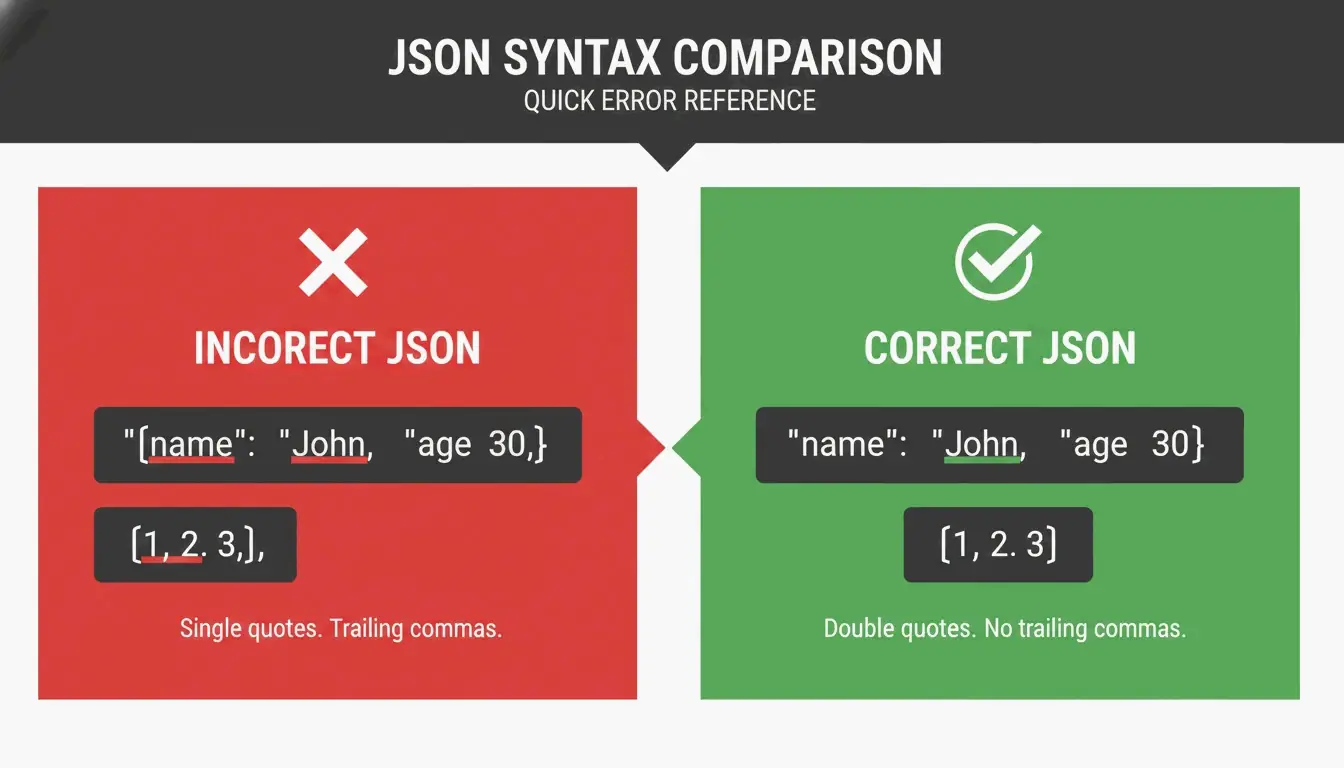
اگر آپ کا JSON ہی ٹوٹا ہوا ہو تو بہترین فارمیٹر بھی کام نہیں کرے گا۔ یہاں تین سب سے عام “JSON کلرز” اور ان کا حل ہے۔
کلر 1: ٹریلنگ کاماز
// BROKEN
{
  "name": "Alice",
  "role": "admin",   // <-- this comma is illegal
}

// FIXED
{
  "name": "Alice",
  "role": "admin"
}
کلر 2: سنگل کوٹس
// BROKEN
{'name': 'Alice'}

// FIXED
{"name": "Alice"}
کلر 3: بغیر کوٹس والی کلیدز
// BROKEN
{name: "Alice"}

// FIXED
{"name": "Alice"}
ڈیبگنگ چیک لسٹ
فارمیٹ دبانے سے پہلے ان تین چیکس سے گزریں:
}یا]سے پہلے کوئی اضافی کومہ تو نہیں؟- تمام سنگل کوٹس ڈبل کوٹس سے تبدیل کر دیے گئے؟
- ہر کلید ڈبل کوٹس میں لپیٹی ہوئی ہے؟
اگر پھر بھی ناکامی ہو تو JSON Formatter Pro جیسے ویلیڈیٹر کا استعمال کریں جو آپ کو قطعی لائن اور کریکٹر پوزیشن بتائے۔ ایرر کوئی نظر نہ آنے والا “گھوسٹ” کریکٹر بھی ہو سکتا ہے — زیرو وڈتھ اسپیس یا BOM جو کسی کاپی پیسٹ سے آ گھسا ہو۔
فوری موازنہ: 2026 کا ٹول لینڈ اسکیپ
| ٹول | ٹائپ | کلائنٹ سائیڈ | لاگت | بہترین استعمال |
|---|---|---|---|---|
| jq | CLI | نہیں (لوکل) | مفت | ٹرمینل ورک فلوز، اسکرپٹنگ |
| JSON Alexander | براؤزر ایکسٹینشن | ہاں | مفت | براؤزر میں فوری فارمیٹنگ |
| FormatArc | ویب ٹول | ہاں | مفت | براؤزر میں ایک بار فارمیٹنگ |
| python3 -m json.tool | CLI (بلٹ ان) | نہیں (لوکل) | مفت | فوری پائپس، انسٹالیشن کے بغیر |
| JSON.stringify() | نیٹیو JS | نہیں (لوکل) | مفت | Node.js ڈویلپمنٹ |
اختتامیہ
2026 تک، JSON فارمیٹر کا انتخاب ایک سیکیورٹی فیصلہ ہے۔ ایکسٹینشنز کے حالیہ ایڈویئر میں تبدیل ہونے کی لہر یہ ثابت کرتی ہے کہ “مفت” ٹولز کی چھپی ہوئی قیمت ہو سکتی ہے۔ آپ کی API کلیدز اور اندرونی پے لوڈ کے بہتر سلوک کے حقد ہیں۔
آپ کا ایکشن پلان: اپنی موجودہ ایکسٹینشنز کا آڈٹ کریں۔ ان تمام کلوزڈ سورس ٹولز کو ڈیلیٹ کریں جنہوں نے حال ہی میں اپنی پرائیویسی پالیسی تبدیل کی ہے۔ روزمرہ کاموں کے لیے ٹرمینل میں jq استعمال کریں یا JSON Alexander جیسے کمیونٹی تصدیق شدہ اوپن سورس ٹولز چنیں۔ آپ کا ڈیٹا وہیں رہے جہاں اس کا حق ہے — آپ کی اپنی مشین پر۔
اکثر پوچھے جانے والے سوالات
حساس API ڈیٹا کو آن لائن JSON فارمیٹر میں پیسٹ کرنا محفوظ ہے؟
صرف اسی صورت میں جب ٹول 100 فیصد کلائنٹ سائیڈ پروسیسنگ استعمال کرتا ہو، یعنی آپ کا ڈیٹا براؤزر میں رہے اور کبھی سرور کو نہ بھیجا جائے۔ ٹول کی پرائیویسی پالیسی دیکھیں اور اپنے نیٹ ورک لاگز کی نگرانی کریں۔ ہائی سیکیورٹی ماحول کے لیے jq جیسے لوکل CLI ٹولز تجویز کردہ معیار ہیں۔
ٹریلنگ کوموں یا سنگل کوٹس کی وجہ سے JSON پارس ایرر کیسے ٹھیک کروں؟
JSON تمام کلیدز اور اسٹرنگ ویلیوز کے لیے ڈبل کوٹس کا تقاضا کرتا ہے؛ سنگل کوٹس ہمیشہ ایرر پیدا کرتے ہیں۔ کسی اری یا آبجیکٹ کے آخری عنصر کے بعد آنے والے تمام کوماز ہٹا دیں۔ FormatArc یا JSON Formatter Pro جیسے ویلیڈیٹر سے ایرر والی مخصوص لائن اور کریکٹر کو ہائی لائٹ کریں۔
GUI JSON فارمیٹرز کے بہترین کمانڈ لائن متبادل کون سے ہیں؟
انڈسٹری کا معیار jq ہے جو بیوٹیفائی اور فلٹرنگ دونوں کرتا ہے۔ Python کا بلٹ ان json.tool ماڈیول ایک بہترین زیرو انسٹال متبادل ہے۔ Node.js ڈویلپرز npx json-beautifier سے گرافیکل انٹرفیس کے بغیر فوری لوکل فارمیٹنگ کر سکتے ہیں۔
میں کیسے جاؤں کہ کوئی براؤزر ایکسٹینشن استعمال کے لیے محفوظ ہے؟
تین باتیں چیک کریں: کیا یہ اوپن سورس ہے اور اس کی فعال مینتیننس ہو رہی ہے؟ کیا اس کی پرائیویسی پالیسی میں صاف صاف کلائنٹ سائیڈ پروسیسنگ کا ذکر ہے؟ کیا یہ حال ہی میں اپ ڈیٹ ہوا؟ اگر کوئی ایکسٹینشن کلوزڈ سورس ہو گئی ہو، حال ہی میں پالیسی بدلی ہو، یا مہینوں سے اپ ڈیٹ نہ ہوئی ہو، تو کوئی متبادل تلاش کریں۔