Best JSON Formatter Tools for 2026: Secure, Privacy-First, and Ad-Free Options

Best JSON Formatter Tools for 2026: Secure, Privacy-First, and Ad-Free Options

6 min read

A JSON Formatter is a developer tool used to beautify r […]

A JSON Formatter is a developer tool used to beautify raw, minified data into a readable structure using indentation and syntax highlighting. For maximum security in 2026, prioritize client-side tools like FormatArc, terminal commands like jq, or verified open-source extensions like JSON Alexander to prevent sensitive data leaks and avoid adware tracking.

How to Choose a Secure JSON Formatter in 2026

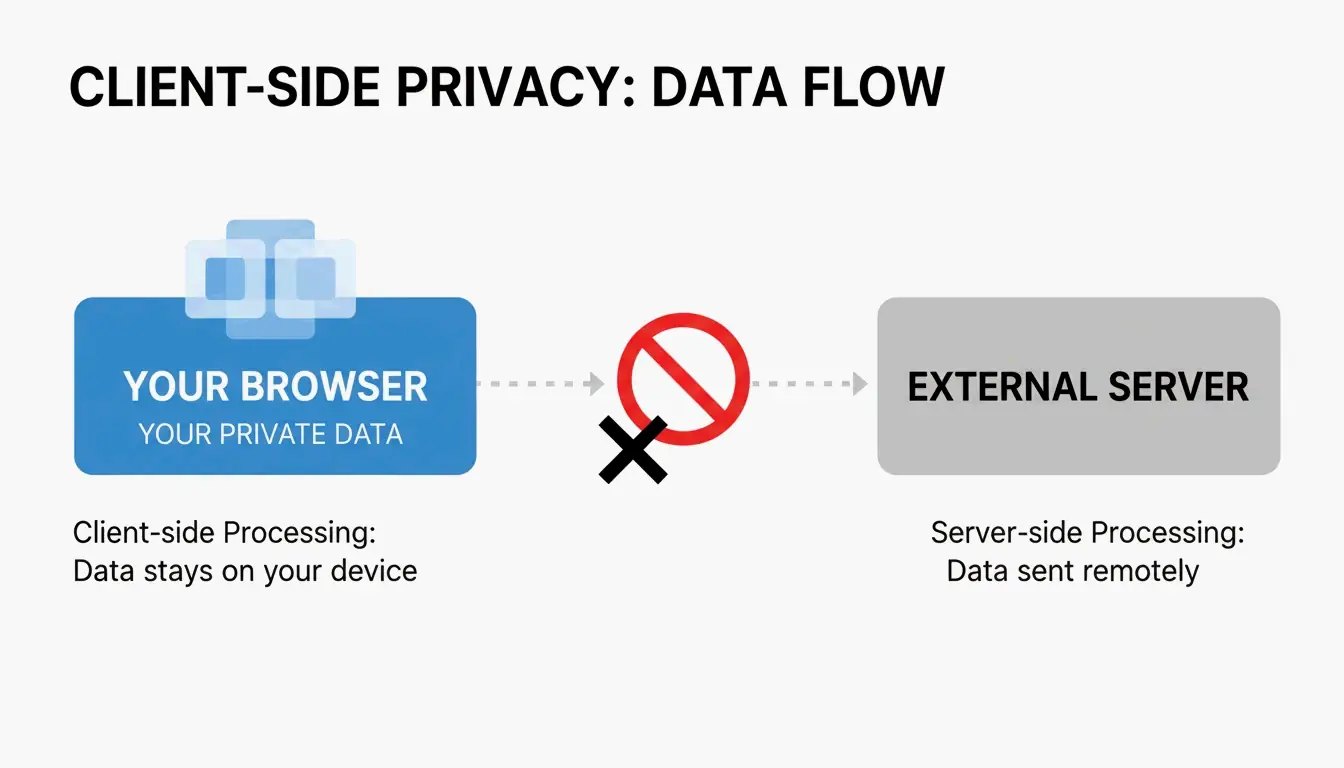
When picking a JSON Formatter today, security isn’t just a bonus—it’s the baseline. The industry has moved toward privacy-first tools to stop data interception before it starts. The gold standard here is Client-side Processing. This means your JSON data—which often contains sensitive API keys or personal user info—stays inside your browser and never travels to an external server.

Beyond keeping data safe, you need a tool that actually makes debugging easier. Look for these two features:

  1. Syntax Highlighting: This uses colors to distinguish data types (like green for strings or orange for numbers), so you can scan the structure at a glance.
  2. Collapsible Tree View: This lets you fold or unfold nested objects and arrays, helping you navigate deep data structures without getting lost.

Visualizing the 'Client-side' vs 'Server-side' data flow concept.

As noted by JSON Formatter & Viewer, most modern browser formatters have a 10 MB performance warning threshold. If your file is bigger than that, the browser tab might freeze. In those cases, professional tools will usually suggest viewing the raw text or switching to a local processor.

The Security Audit: Why Local Processing Matters

According to FormatArc, security is the biggest risk when you paste internal configs or API payloads into web tools. A local-only workflow ensures that clicking “Format” just runs a JavaScript function in your browser rather than sending a POST request to a remote database. You can test this yourself: open your browser’s Network tab. A secure tool won’t show any outgoing traffic while it processes your data.

The 2026 Extension Controversy: Is Your JSON Formatter Safe?

The developer community recently hit a major snag with browser extensions. In March 2026, several popular JSON formatters pivoted to an adware model. Reports on Hacker News revealed that one widely used extension (v2.1.14) started injecting ads into checkout pages and tracking users’ locations without permission.

This situation highlights the risks within the Manifest V3 ecosystem. Even though Manifest V3 was supposed to improve security by limiting background tasks, it doesn’t stop extensions from using “content scripts” to mess with webpage data or pop up annoying “donation appeals” that act just like adware.

The backlash was huge. Data from ChromeBoard and community threads suggest over 2 million users were affected. As the original developer of one compromised project mentioned in a GitHub README: “I am no longer developing JSON Formatter as an open source project. I’m moving to a closed-source, commercial model.”

In response, JSON Alexander has become the new favorite for open-source fans. Created by Wes Bos, a well-known figure in web dev, it was designed to be a clean, lightweight alternative you can actually trust. It stays transparent and avoids the “hero to villain” path by focusing purely on formatting without hidden tracking.

Mastering the Command Line with jq and Native Methods

If you want total control over your data, the terminal is your best bet. jq is the industry standard for command-line JSON processing. It lets you filter, change, and beautify data without ever touching a browser. A quick command like echo '{"id":1}' | jq . gives you perfectly formatted output instantly.

If you’re already writing JavaScript or working in Node.js, you don’t even need a tool. You can use the native JSON.stringify() method. Just add a third argument to set the indentation level:
JSON.stringify(data, null, 2);

Quick Guide: Formatting JSON with Python and Node.js

If you don’t have jq handy, try these built-in alternatives:

  • Python: Run python3 -m json.tool to format any input you pipe into it.
  • Node.js: Use npx json-beautifier for a quick, local workflow that doesn’t require a permanent install.

Problem-Solving: Fixing Common JSON Parse Errors

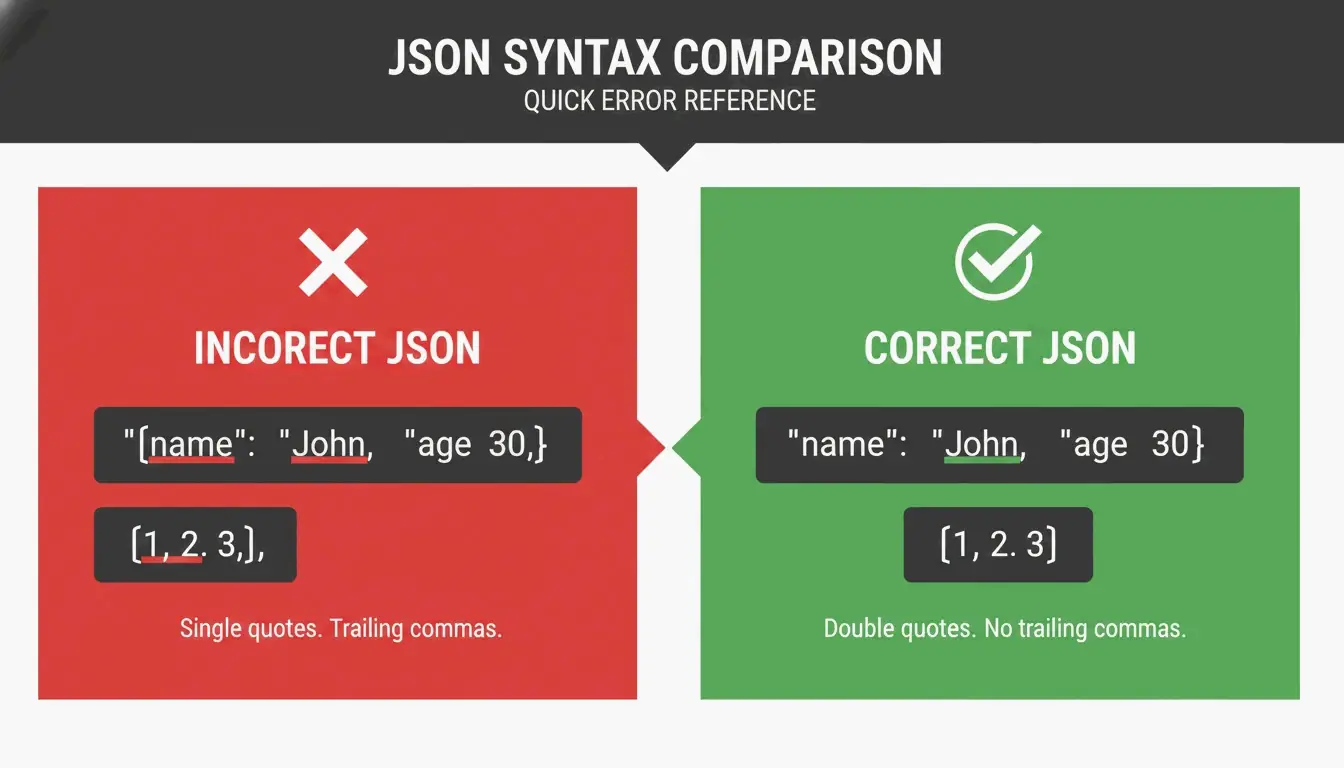
Even the best tool won’t work if your JSON is broken. The first step to debugging is spotting “JSON Killers”—the small typos that break the format. The most common culprits are:

  • Trailing Commas: Unlike regular JavaScript, JSON doesn’t allow a comma after the last item in a list or object.
  • Single Quotes: The JSON spec (RFC 8259) is strict—you must use double quotes for both keys and string values.
  • Unquoted Keys: Every key must be wrapped in double quotes (e.g., "name": "value").

A simple 'Right vs Wrong' comparison of JSON syntax rules.

Tools like JSON Formatter Pro help by giving you clear error messages that point to the exact line and column. Once the data is valid, you might need to Minify it (strip out whitespace to save space) or convert it to formats like Parquet or CSV for data analysis.

Debugging Checklist: Before You Hit Format

If your data isn’t formatting, check these three things:

  1. Are there any extra commas at the end of lists?
  2. Are all single quotes replaced with double quotes?
  3. Is every key wrapped in quotes?
    If it’s still failing, use a validator that gives you a specific character position to find invisible “ghost” characters.

Conclusion

By 2026, choosing a JSON Formatter is a security decision. The recent trend of browser extensions turning into adware shows that “free” tools often have a hidden cost. To keep your environment safe, audit your current extensions and move toward verified, client-side options.

Action Plan: Delete any closed-source extensions that have recently changed their privacy policies to include tracking. For daily work, stick to jq in the terminal or use community-vetted tools like JSON Alexander to keep your API data private.

FAQ

Is it safe to paste sensitive API data into online JSON formatters?

It is only safe if the tool uses 100% client-side processing, meaning your data stays in the browser and is never sent to a server. You should always check the tool’s privacy policy and monitor your network logs to be certain. For high-security environments, using local CLI tools like jq is the recommended standard.

How do I fix a ‘JSON Parse Error’ caused by trailing commas or single quotes?

JSON standards require double quotes for all keys and string values; single quotes will always trigger an error. You must also remove any commas that appear after the last element in an array or object. Using a validator like FormatArc or JSON Formatter Pro can help by highlighting the specific line and character where the error occurs.

What are the best command-line alternatives to GUI JSON formatters?

The industry standard is jq, which is powerful for both beautifying and filtering data. If you don’t want to install new software, Python’s built-in json.tool module is an excellent zero-install alternative. Node.js developers can also use npx json-beautifier for quick, local formatting tasks without a graphical interface.

Table of Contents