Luau Formatter: What It Changes and How to Use It
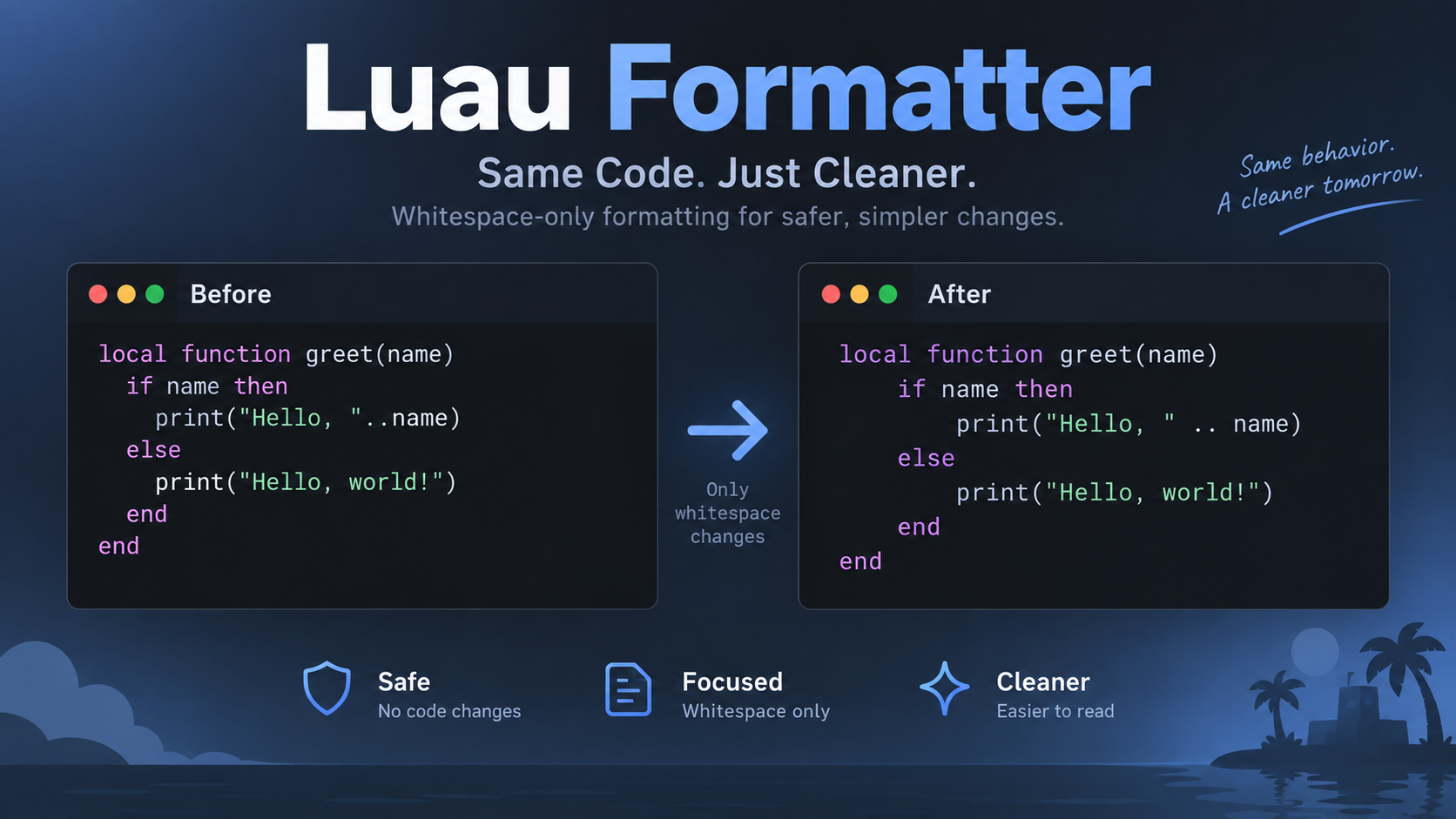
A Luau formatter rewrites Luau source into a consistent layout—spacing around operators, braces, keywords, and type annotations—without changing what the code does. As of October 2026, the Sparkdown formatter runs on save in its VS Code extension and web editor, and it must return identical output when run again.
What a Luau Formatter Actually Changes (and What It Never Touches)
A Luau formatter only rewrites the layout layer of a file: the space around operators, the space inside braces, line breaks and indentation after keywords, and spacing inside type annotations. The program’s behavior stays the same.
That boundary comes from the parser. A formatter edits whitespace that has already been classified into grammar nodes. It does not rename identifiers, reorder expressions, or rewrite the contents of strings. If a formatting diff changes anything other than whitespace, that is an implementation defect, not a feature.
In this ecosystem, the formatter is Sparkdown‘s document formatter, exposed as getDocumentFormattingEdits under packages/sparkdown-language-server/src/utils/providers/. The VS Code extension and the web editor share that one provider, so both surfaces produce the same output. Only the trigger—a save event versus Mod-S—and the surrounding UI differ.
Every rule follows a simple model: whitespace falls into two categories. Whitespace the parser judges to be extra is deleted. Whitespace judged to be an optional separator is normalized to exactly one space. In the ImpowerGames/impower tracker, most formatting bugs trace back to a single grammar rule putting a token in the wrong category.
The practical test for this class of formatter is the diff itself: it should show whitespace changes only. If tokens move, either you are running a different tool or the build is broken.
The two whitespace categories behind every Luau formatting rule
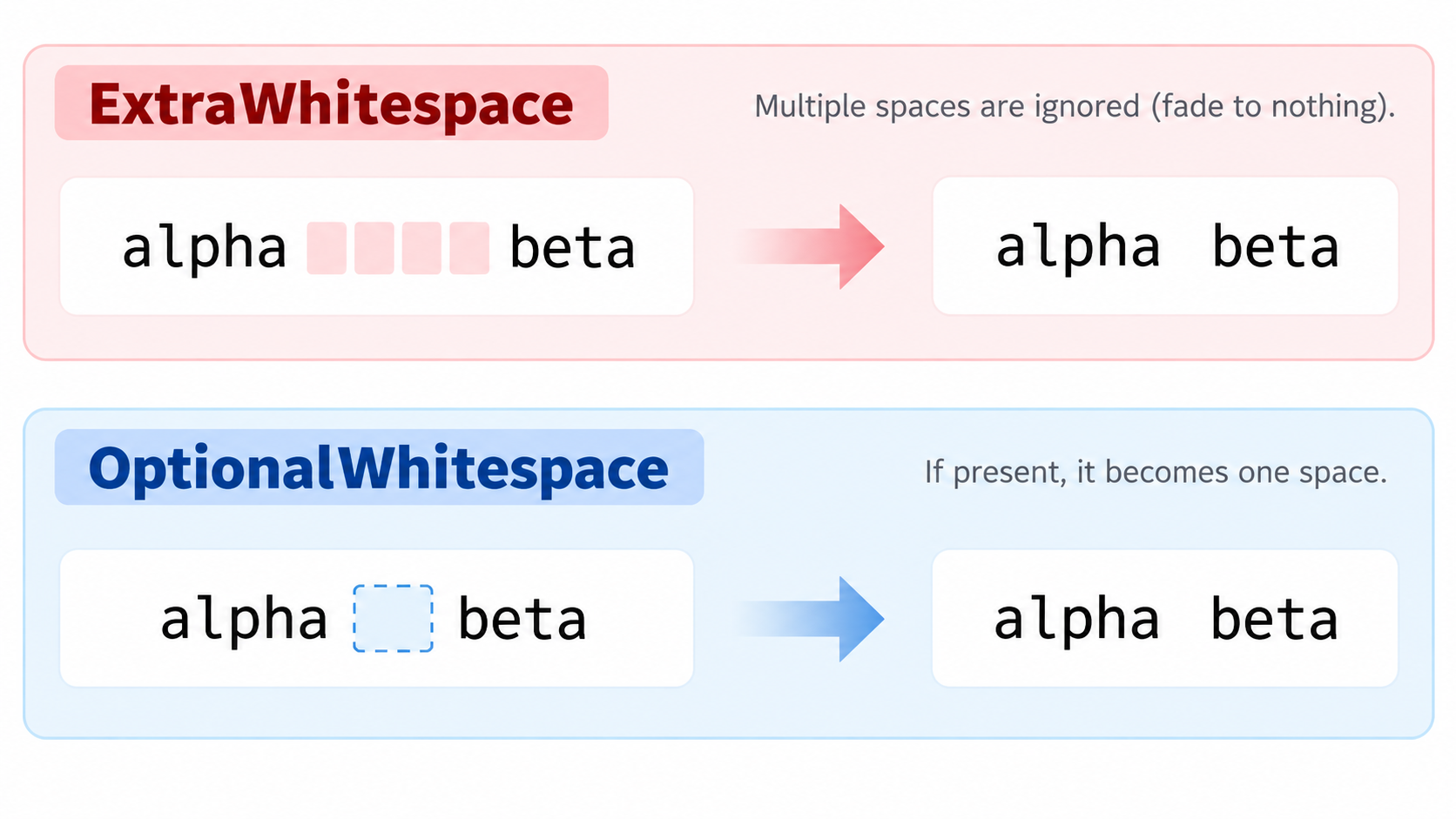
The difference between ExtraWhitespace and OptionalWhitespace explains behavior that otherwise looks arbitrary. ExtraWhitespace collapses to nothing. OptionalWhitespace acts as a separator: if it is empty, one space is inserted; if it contains several spaces, it shrinks to one.
Issue #1108 shows both categories hitting the same source position. In {[k] = v}, the space after ] is the first capture of LuauAssignmentOperation‘s begin, and that capture is classified ExtraWhitespace, so the formatter deletes it. In the rewritten {[k]= v}, that same capture is empty, and the leading capture of LuauAssignmentOperator becomes a zero-width OptionalWhitespace between ] and =, which the formatter widens to one space. The two classifications take turns undoing each other.
FormattingAnnotator: marking the whitespace a formatter is allowed to edit
FormattingAnnotator, in packages/sparkdown/src/compiler/classes/annotators/, labels whitespace nodes so the formatter knows what it may touch. A mid-line OptionalWhitespace is marked as a separator, which normalizes it to one space and inserts one when it is empty.
The annotator also keeps the explicit exceptions. It forces a trailing space for the keywords listed in KEYWORDS_REQUIRING_TRAILING_SPACE and for the concat operator ... That keeps the forced-space rules in one table instead of scattering them across the formatter. When a keyword or operator is missing from that table, the generic character-level rule wins and the space disappears—the source of several bugs below.
How to Run a Luau Formatter on Save in VS Code and the Web Editor
Getting format-on-save working correctly takes three steps, and the order matters. The third step is the one that protects your code.
- Open a
.luaufile in VS Code with the Sparkdown extension installed, or open your project in the web editor. The extension and the web editor are both labeled surfaces on the same Sparkdown provider, so the rules are identical in either place. - Point the language’s default formatter at Sparkdown’s document formatter, then enable
editor.formatOnSave. If you prefer not to auto-save,Mod-Sin the web editor triggers the same formatting path manually. That is the recommended way to start. - Format once manually and read the diff before you enable automatic saving. Confirm the change is whitespace-only. If you turn on format-on-save first, the very first run can touch valid code before you have verified what the build does.
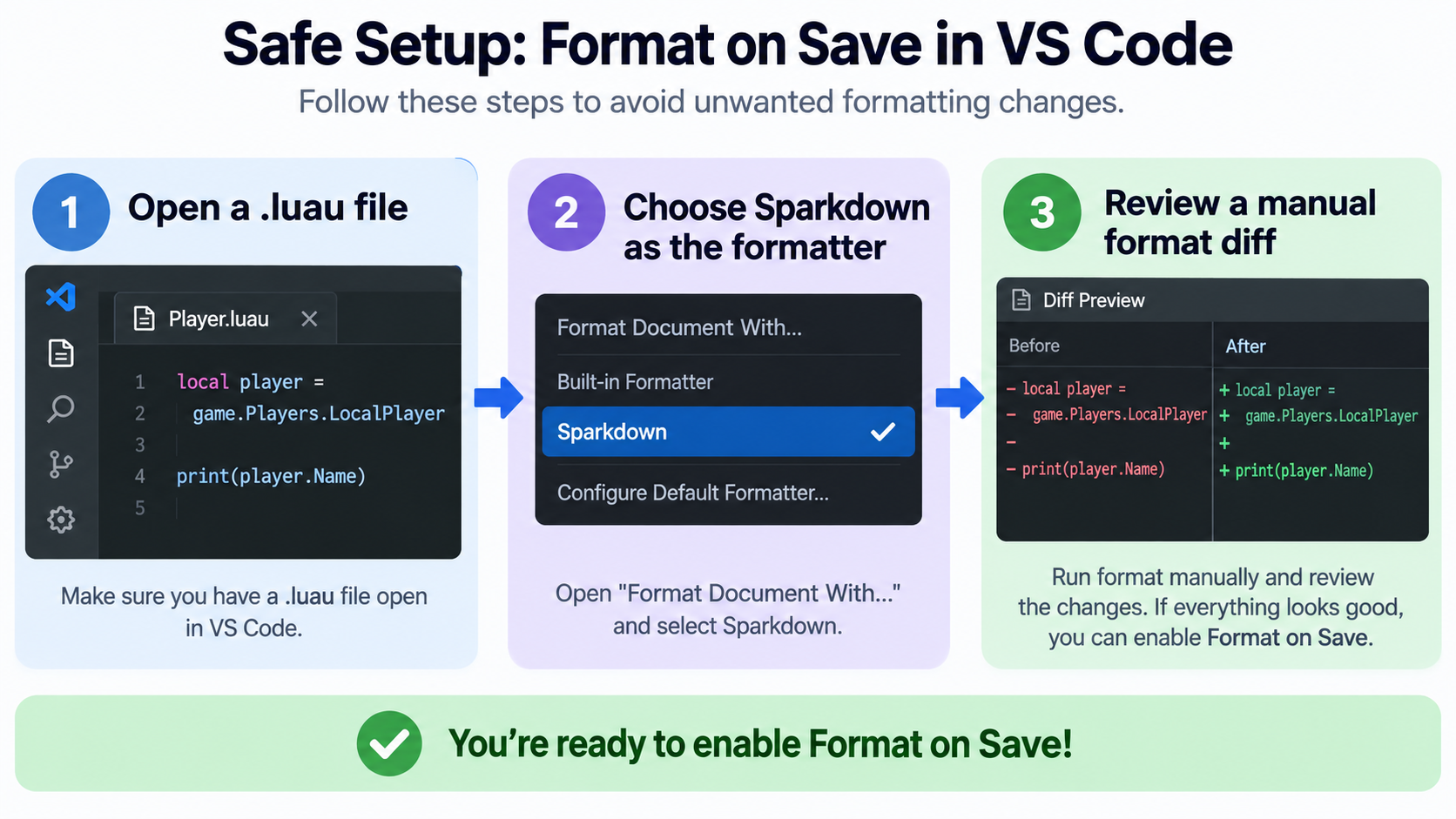
Steps 1 and 2 are easy. Step 3 exists because editor-side behavior is treated as a separate verification item in this project, not as a given. Issue #1226 and issue #1227 both list editor verification in their acceptance criteria: a screenshot of Mod-S in the web editor before and after, and format-on-save checked in a desktop development host or explicitly disclosed as unchecked. The rule layer can be validated in Node while the editor path has not been driven at all. Several issues state plainly, “Reproduced in Node; not checked in either editor.”
What a safe Luau formatting diff should look like
A safe diff only adds or removes spaces and blank-line whitespace—nothing else. The specific shapes to expect are the ones the tracker pins: a space added inside a one-line table’s braces, a trailing space restored after return, or several spaces reduced to one around an operator.
If you see a keyword merged into a following brace (return{1}), a type’s spacing changed (Array <number >), or a bracketed key whose = spacing flips on the next save, stop. Treat it as an implementation problem. Do not edit your source to match the output.
Confirming you are running the Sparkdown document formatter
Several extensions can register a formatter for the same language, so when output looks wrong, check which provider actually ran. Set Luau’s default formatter explicitly to Sparkdown’s document formatter instead of picking from a list each time. That way, formatOnSave cannot silently route to a different tool.
The second check is the surface. The language server’s document formatter is the shared one. If format-on-save produces a result that the same file does not produce when formatted manually through that provider, the problem is in the editor integration path, not in the spacing rules.
Luau Formatter Spacing Rules: The Before-and-After Reference
These rules are scattered across the acceptance criteria of individual issues. Gathered into one table, each row gives a string you can paste in, the output a correct formatter should produce, and the issue that pins it.
| Input as typed | Expected output | Rule | Source |
|---|---|---|---|
{hp = 8, items = {"potion", "apple"}} |
{ hp = 8, items = { "potion", "apple" } } |
One space after { and one before } in a one-line table |
#1226 |
{k = v}, { 1, 2 }, { [k] = v }, { x: number }, { number } |
{ k = v }, { 1, 2 }, { [k] = v }, { x: number }, { number } |
Same rule for table constructors and table types | #1226 |
{} / { } |
{} / {} |
An empty table stays tight | #1226 |
{{1}, {2}} |
{ { 1 }, { 2 } } |
Nested one-line tables | #1226 |
"HP: {hp}", a backtick string’s {x}, #value={volume} |
unchanged | Interpolation and binding braces are not tables and stay tight | #1226 |
| A multi-line table | unchanged | Contents keep their own lines and indentation; trailing-comma rule unchanged | #1226 |
return { 1 }, in { 1, 2 } |
space kept | A keyword before a table keeps its space | #1226 |
f{ 1 }, a[1], f(x) |
tight | A call keeps no space | #1226 |
Array<number>, Map<string, number> |
unchanged | Generics stay tight against the type name | #1095 |
number?, local u: number? = 1 |
unchanged | Optional ? glued to the type; = keeps one space each side |
#1065 |
local x = y :: number |
unchanged | :: keeps one space on each side |
#1099 |
local x: number, obj:method() |
unchanged | The annotation and method-call colon stays tight | #1099 |
s ..= "b" |
unchanged | ..= keeps its leading space |
#1114 |
x += 1, x -= 1 |
unchanged | The other compound assignments keep their space | #1114 |
local s = 'x' .. 'y' |
local s = "x" .. "y" |
Single-quoted strings normalize to double quotes; the operator space survives | #1097 |
One-line Luau tables and table types: inner brace spacing
Tables should end up as { hp = 8, items = { "potion", "apple" } }: one space after the opening brace and one before the closing brace. This applies to one-line table constructors (nodes LuauTable, LuauTypeTableStruct) and one-line table types. { a = 1 }, { 1, 2 }, { [k] = v }, { x: number }, and { number } all follow the same rule. A nested table such as {{1}, {2}} becomes { { 1 }, { 2 } }.
The rule has to be implemented by node rather than by character because { and } are the same characters used in interpolation braces. The formatter historically decided spacing by character, with { in NO_SPACE_AFTER and } in NO_SPACE_BEFORE at getDocumentFormattingEdits.ts:23. That is why { a = 1 } collapsed to {a = 1}, and why a define table and an animation block on neighboring lines could be spaced differently.
Tight suffixes: generics, optional ?, and interpolation braces
Three suffixes stay glued to what comes before them: generic angle brackets, the optional type ?, and interpolation or binding braces.
For generics, the expected output is unchanged input. Array<number> and Map<string, number> keep no space before < or before >. At bfb1197a6, the formatter instead produced Array <number > and Map <string, number >. The cause: LuauTypeName and LuauPrimitiveType end with a trailing _LUAU_BINARY_OPERATOR_AHEAD_ whose lookahead includes the comparison operators <=? and >=?. As a result, the < and > of a generic looked like a comparison that could follow a value. The output was stable on a second pass, so a formatted script kept the misspelled type.
The same mechanism produced number ? for the optional suffix. When a value followed (local u: number? = 1), the space before = was also removed, yielding local u: number ?= 1—a line that reads like a ?= operator (issue #1065, reported at c51ea0bfa). A type without the suffix, such as local s: string, was left alone.
Operators that keep their spaces: :: and ..=
Two operators are easy to get wrong because the character-level rule looks past the operator.
The cast operator :: should keep one space on each side, the same as y + 1 or a .. b. At bfb1197a6, the formatter emitted local x = y:: number. The space before :: is an OptionalWhitespace passed to shouldInsertSpaceBetween; the next character is the first : of ::, and : sits in NO_SPACE_BEFORE, so the separator collapsed. The space after :: is a separate node and survived, giving an asymmetric result (issue #1099). The tight colon in local x: number and obj:method() must stay tight under the same fix.
The ..= compound assignment should keep one space before it, as += and -= already did. At 96ebb1a1d, the formatter produced s..= "b", because the character following the separator is the first . of ..= and . is in NO_SPACE_BEFORE (issue #1114). Single-quoted string normalization interacts with the same area: local s = 'x' .. 'y' was normalized to double quotes, but the first pass also dropped the operator space to "x".. "y", and only a second format restored it (issue #1097).
Formatting Idempotency: Why Formatting a Luau File Twice Must Match Once
A formatter must be a fixed point of its own output: running it on an already-formatted file must reproduce that file character for character. This is not an optimization target—it is the acceptance bar. Issue pages in this project say so directly, requiring that “formatting twice gives the same text as formatting once for every format fixture.”
Idempotency matters because format-on-save runs the formatter on every save. If the formatter is not a fixed point, a whitespace position can flip back and forth on each save. That creates a permanent noise diff and makes code review useless—reviewers cannot tell a real change from the formatter toggling a space.
The clearest failure case is issue #1108, reported at 34406f45f. local t = {["k"] = "v"} becomes {[k]= v} on the first pass, and the second pass restores {[k] = v}. The root cause is the category mismatch described earlier: the space after ] is captured as ExtraWhitespace and deleted in one spelling, while in the other spelling the capture is empty and only a zero-width OptionalWhitespace remains, which is widened to a space. Each pass undoes the last.
A second, more dangerous class exists: output that is stable but wrong. A second-pass check cannot detect that a misspelling has been frozen in place. The generic and optional-type cases are exactly this—Array <number > and number ? were both verified to be stable on a second pass, so no round-trip test would have caught them. Idempotency is necessary, not sufficient.
A two-pass idempotency test you can run on any Luau formatter
The test is mechanical. You do not need to read the formatter’s source or trace the maintainer’s code paths.
- Save a copy of the file you want to check.
- Format it once and save the result as pass 1.
- Format pass 1 and save the result as pass 2.
- Diff pass 1 against pass 2. Any byte of difference means the build is not a fixed point.
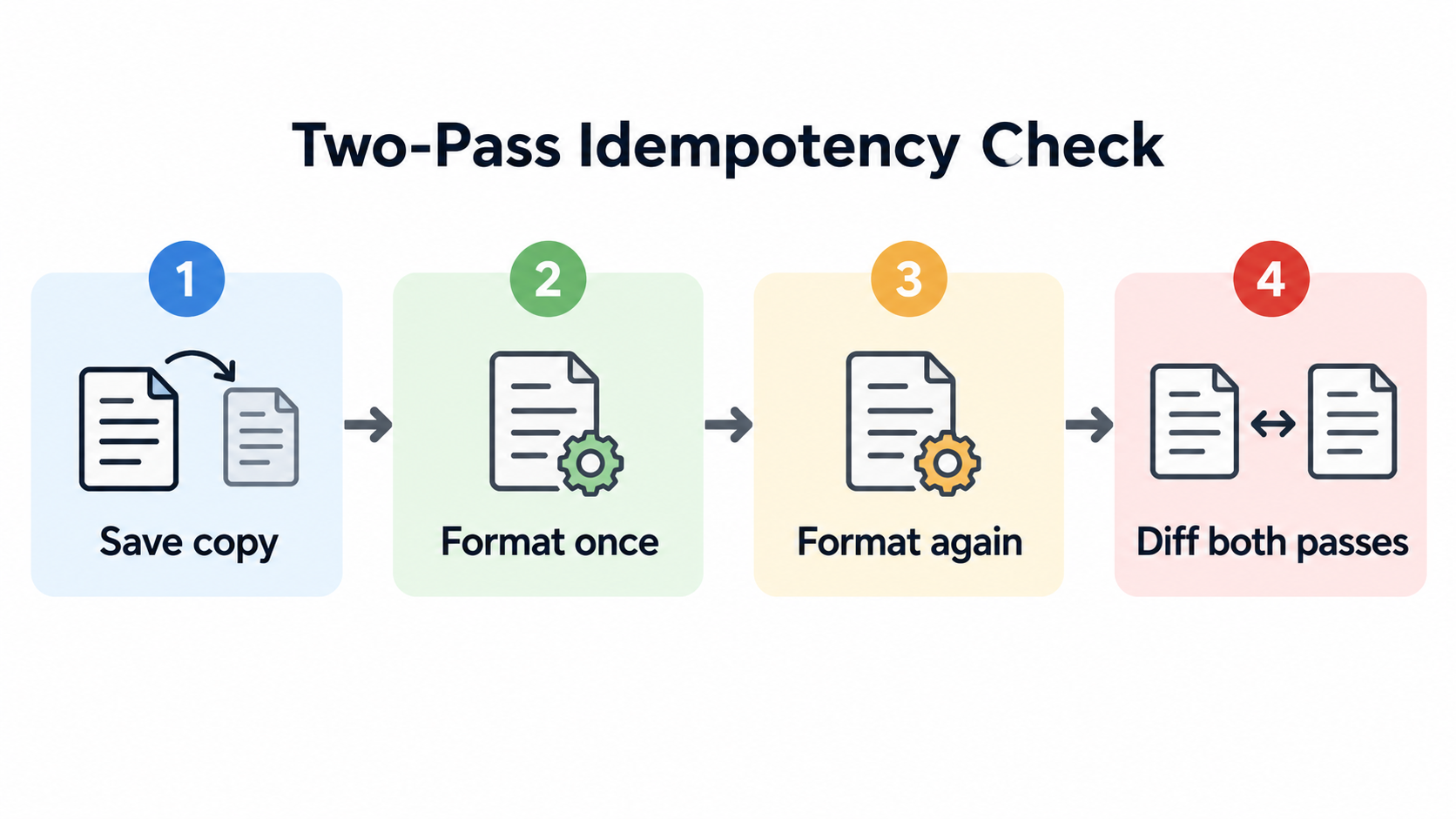
In this repository, the same check runs in-process. formatSource in packages/sparkdown-language-server/src/tests/formatter/formatSource.ts drives getDocumentFormattingEdits over a source string, which is how the reproductions above were measured. deltaFormatEquivalence.test.ts passes only when the invariants hold. You can exercise a single file with node scripts/test-suite.mjs run packages/sparkdown-language-server src/tests/formatter/<your-test>.test.ts --wait 1500.
Two habits make the test more useful. First, run three passes instead of two when a quote-normalization change is involved—the 'x' .. 'y' case needed a second format before the operator space reappeared. Second, treat “pass 1 equals pass 2” as only half a result. Inspect the text itself for spellings nobody would write.
When a Luau Formatter Rewrites Good Code Into Odd-Looking Spelling
The most visible symptom is a keyword glued to the brace or string that follows it. return {1} becomes return{1}, for k in {1, 2} do becomes for k in{1, 2} do, if c then {1} else {2} becomes then{1} else{2}, and return [[s]] becomes return[[s]] (issue #1110, reported at 34406f45f).
The code still runs, but the formatter has rewritten common, well-formed Luau into a spelling that reads like a function call—f{1}—which is not how anyone writes the language. The reported cases cover four keywords: return, in, then, and else. The result is stable on a second pass, so nothing self-corrects.
The second symptom is type-layer output that is stable and wrong: Array <number >, number ?, and y:: number from the previous section. All three survive a round-trip check.
A related trap is confusing brace bodies with tables. The { ... } bodies of layout, style, animation, theme, component, morph, and screen blocks are indented by block depth, and a closing } lines up with its header. They are not Luau tables, so the one-line table spacing rule does not apply. A one-line block gets { a = 1; b = 2 }, with one space after each ;, one space before a block’s {, and one on each side of an optional =. Issue #1226 explicitly leaves those brace blocks out of its scope.
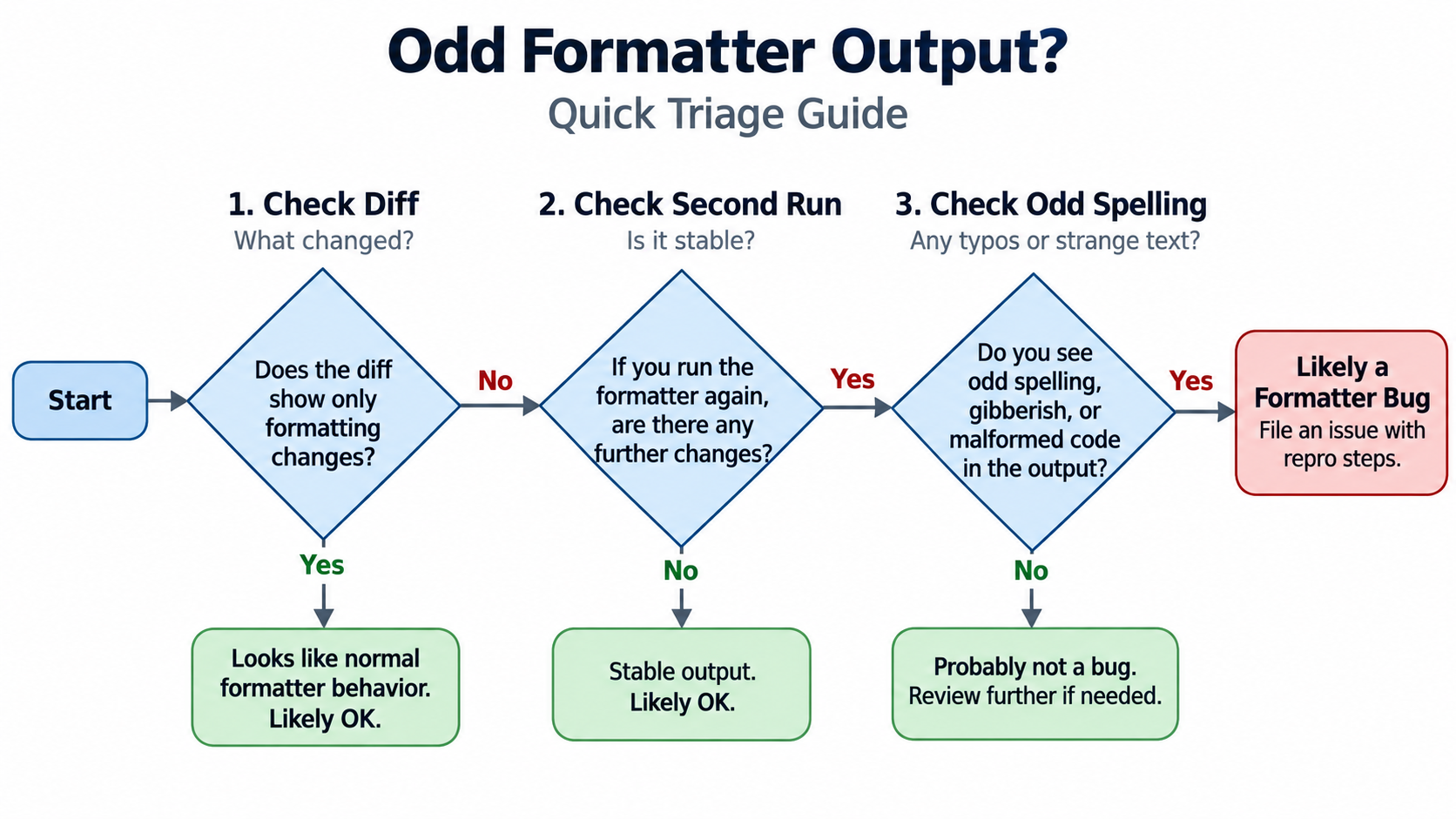
Is it my code or the formatter build? A short diagnostic order
Work through these in order, and stop at the first one that matches.
- Is the diff whitespace-only? If so, the formatter is behaving within its design. If tokens moved, were renamed, or a string’s contents changed, stop—that is a defect, and you should not commit the result.
- Does the output change on a second run? Format the result again and diff. A difference means a broken fixed point; record the input, the build, and the two outputs.
- Is the output stable but spelled unusually? If
return{1}orArray <number >comes back unchanged the second time, the problem is the implementation’s spacing rules, not your source. Rewriting your code to match it will only make the file harder to read.
The ImpowerGames/impower root cause and umbrella issue #1104
Most of these cases converge on one underlying defect class. Issues #1108, #1110, #1095, #1099, and #1114 are each filed under the umbrella item #1104 and fixed on pull request #1107. They are different surface symptoms of the same whitespace-classification problem, found by successive review rounds of that PR.
The structural reason they cluster is that the formatter historically decided spacing by looking at adjacent characters, while the classification lives on parse-tree nodes. FormattingAnnotator forces a trailing space for keywords in KEYWORDS_REQUIRING_TRAILING_SPACE, but only when the next character is (. A keyword followed by { or [ therefore fell through to the call-gluing rule, and else was absent from the set entirely. The ..= operator was missing from the forced-space table that already covered ...
The tracker also carries the proposed regression net for this class. Issue #996 describes a layout-variant oracle: take Luau code that already runs green, mechanically rewrite it into one-line, glued-keyword, semicolon, and comment layouts that Luau defines as equivalent, run each rewrite through the conformance harness, and require the same output text, the same returnedOK, and no new diagnostic. The motivation is that 22 upstream conformance fixtures passed end to end while ten layout-specific Luau bugs filed between 2026-09-26 and 2026-09-27 existed, because those fixtures are all written in one tidy layout.
Version and Status Caveats: What’s Fixed and What’s Still Open
Every rule in this article is tied to a specific issue and commit, because formatting defects are fixed continuously and different builds can behave differently. The commits cited above are 34406f45f (the bracketed-key spacing toggle and the keyword gluing), bfb1197a6 (generics, ::, single-quoted strings), c51ea0bfa (optional ?), 96ebb1a1d (..=), and 871116e (the line numbers cited for the table-spacing rule).
Before treating any row of the reference table as current behavior, re-test it against the build you actually have. The behavior descriptions here reflect the state of the code at those commits, and the issue pages show the related work landing on pull requests #1077, #1107, and #1245.
Two items were still shown as open at the time of writing in early October 2026. #1227, which formats brace bodies by brace depth across the seven block constructs in the Sparkle UI system, is open with a linked pull request. #996, the Luau conformance layout-variant oracle, is also open.
One scope limit applies to everything here: the whole corpus comes from the tracker of a single repository, ImpowerGames/impower. These rules describe the conventions of one implementation—Sparkdown, as shared by the VS Code extension and the web editor—not an official standard of the Luau language.
Conclusion
A trustworthy Luau formatter changes only layout, never semantics, and it must be a fixed point of its own output. You can verify both properties yourself: check that the diff contains nothing but whitespace, and check that a second run produces a byte-identical result to the first. Start by formatting a scratch file with the constructs you use most—one-line tables, optional types, generics, ::. An online Luau formatter is the zero-setup scratchpad for that first pass: paste the script, get back cleanly indented code with type annotations preserved, then compare the spacing decisions against the reference table above. Only then turn on format-on-save. When a file keeps changing on the second run, record the issue and the build version instead of rewriting your code to match the formatter.
FAQ
Why does formatting my Luau file twice give a different result than formatting it once?
The formatter is not a fixed point: a whitespace position is deleted on one pass and restored on the next. The typical cause is that the same position is classified as extra whitespace in one spelling and optional whitespace in another (issue #1108). Diff the two outputs and report it to the maintainers rather than editing your code.
Does running a Luau formatter change what my code does?
By design, it does not. It changes whitespace, line breaks, and space inside braces, and never token order or string contents. When the tool is working correctly, a formatting diff is always a whitespace-only diff. If you see keywords reordered or a string rewritten, that is an implementation defect—do not commit it.
What spacing should a one-line Luau table use inside its braces?
One space after { and one before }, giving { a = 1 }, { 1, 2 }, { [k] = v }, and { x: number }. An empty table stays {}, and { } collapses to {}. Interpolation and binding braces stay tight—"HP: {hp}", a backtick string’s {x}. Multi-line tables and the trailing-comma rule are unchanged (issue #1226).
How do I run a Luau formatter on save in VS Code?
Point Luau’s default formatter at Sparkdown’s document formatter so no other extension competes for the language, then enable editor.formatOnSave. In the web editor, Mod-S triggers the same path manually. Format one file by hand and read the diff before you enable automatic saving, so the first run cannot touch valid code unsupervised. And if you just need one snippet cleaned up with no editor configuration at all, an online Luau formatter does the job in the browser—free, no registration, with Roblox style-guide defaults.
Why did formatting turn return {1} into return{1}?
The separator rule glues a call-like opener—(, [, or {—to the preceding word character so that f(x), a[1], and f{1} stay tight. FormattingAnnotator exempts certain keywords with a forced space, but only when the next character is (. else is also missing from that keyword set, so then{1} and else{2} glue the same way (issue #1110). The code still runs, but it reads like a function call; this is an implementation defect, not a problem with your source.